Yes, you can renew your Pakistani passport online, from Pakistan or from abroad, on DGIP’s official portal at onlinemrp.dgip.gov.pk. You create an account, fill in the form, upload your photo, fingerprint form and documents, and pay online. DGIP estimates the form itself takes about 16 minutes if your documents are ready.
This guide covers every step on the website, the photo and fingerprint rules behind most rejections, the official 2026 fees, processing times, and what changes if you live overseas. You can also renew through NADRA’s PakID mobile app; a short comparison is included below.
Quick facts
Official website | |
Run by | Directorate General of Immigration & Passports (DGIP), Ministry of Interior, with NADRA |
Passport you get | Machine Readable Passport (MRP) |
Who can apply | Your passport has expired or expires within 12 months, and your details have not changed |
Payment | Visa or Mastercard debit/credit card; e-Sahulat and JazzCash for applicants in Pakistan |
Delivery | In Pakistan: collect from the passport office you choose (free). Abroad: home delivery or collection from your mission |
Processing | Normal: 21 working days. Urgent: 5 working days (DGIP FAQ) |
Help | 051-111-344-777, Monday to Friday, 8:30 am to 4:30 pm |
Use only the official website. DGIP warns that online passport applications can only be submitted at onlinemrp.dgip.gov.pk and that it has no collaboration with any other website. The government takes no responsibility for data or payments given to look-alike sites.
Who Can Renew a Passport Online?
You can renew online if all of these are true:
Your passport has expired or expires within the next 12 months
You still have the old passport with you
Your details are the same as in your previous passport and NADRA record (no change of name, date of birth, marital status and so on)
You have a valid CNIC, NICOP or Smart Card
What you can do online also depends on where you live:
Service on the portal | Living in Pakistan | Living abroad |
Renewal | Yes | Yes |
Reprint of a lost, damaged or full (exhausted) passport | No | Yes |
New passport for a newborn (up to 2 years) | No | Yes |
Change of surname or marital status after marriage (women) | No | Yes |
Overseas reprint cases need DGIP’s declaration form for a lost, damaged or exhausted passport, signed with two witnesses (available in the portal’s Downloads). DGIP’s requirements page still lists some of these as office-only, so check the portal’s current service table for your case.
You must visit a passport office or mission if you want to change any detail (name, father’s or husband’s name, date of birth, marital status, religion, profession), you lost your passport in Pakistan, or you are applying for your first passport.
Online Passport vs E-Passport: What’s the Difference?
Many people search for “e-passport renewal online”, and the DGIP portal uses the word “E-Passport” in its page titles. The two are not the same:
Online application is the way you apply. DGIP’s portal is only for renewing a Machine Readable Passport (MRP).
E-passport is a passport with an electronic chip. According to DGIP, e-passports have been issued at all passport offices in Pakistan since 16 August 2023, and the service will reach Pakistani missions abroad in due course.
So if you want a chip e-passport, apply at a passport office in Pakistan. Renewing online gives you an MRP.
Documents and Requirements
Keep these ready before you start. DGIP asks for colour scans of original documents; clear phone photos are also accepted.
CNIC, NICOP or Smart Card: valid, both sides
Current passport: the first two pages, plus one random page the system asks for
Overseas only: valid visa, Iqama, residence permit, asylum card, or your other nationality’s passport
Government employees: a No-Objection Certificate (NOC) from your department, which DGIP may verify
A photo that meets DGIP’s rules (see below)
For the fingerprint form: a printer, a black stamp pad and a scanner that can scan at 600 DPI
An email address and mobile number, and your full delivery address
A Visa or Mastercard card. Someone else’s card is allowed with the owner’s consent
For minors (under 18): the child’s NICOP, Smart Card, B-Form or Family Registration Certificate; both parents’ valid CNICs; a guardianship certificate or court decision if the parents are separated; the minor attestation form from the portal’s Downloads; and a death certificate if a parent has passed away. Children under 15 can only get a 5-year passport.
File rules: JPG, JPEG or PNG only.
File | Maximum size |
Supporting documents | 1 MB (DGIP’s upload guide; the form screen may show 3 MB, so keep files under 1 MB to be safe) |
Fingerprint form | 3 MB (ideal 2–2.5 MB) |
Photograph | 5 MB |
Use a laptop or desktop. The portal needs a screen of at least 1280 × 720 and a recent Chrome, Firefox or Opera browser, so it often does not work on a phone. To apply by phone, use the PakID app instead.
How to Create Your DGIP Account and Log In
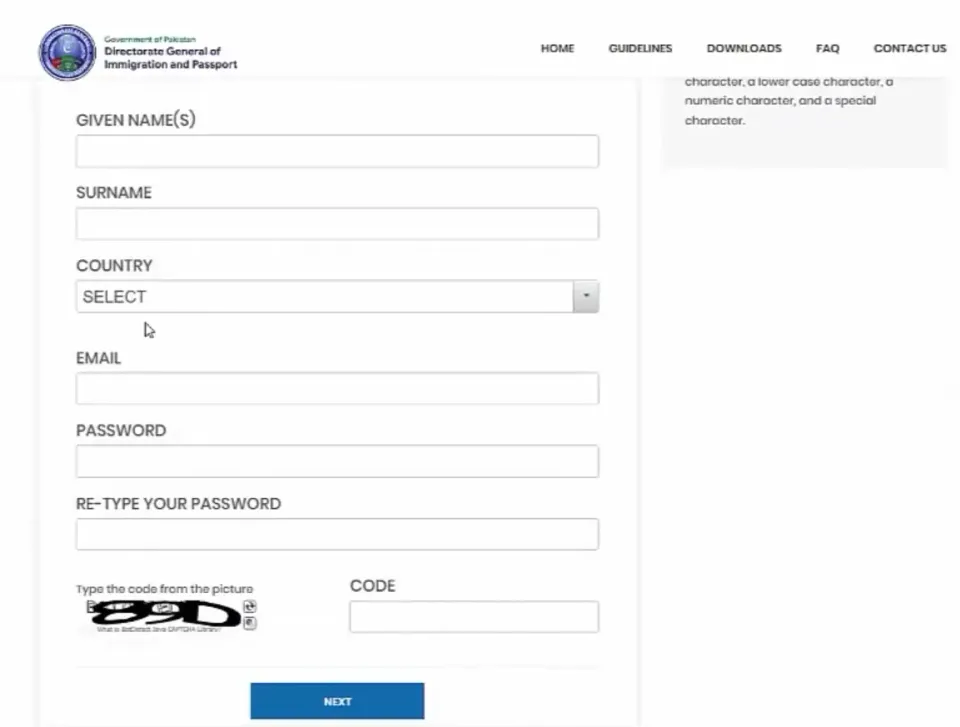
Open onlinemrp.dgip.gov.pk, click Get Started, then Register.
Enter your given name, surname, country, email address and mobile number.
Choose a password of at least 8 characters with an upper-case letter, a lower-case letter, a number and a special character.
Verify your account. In Pakistan, codes come by SMS and email; abroad, by email only.
Log in with your email, password and the picture code (captcha).
If asked, set up two-factor authentication: scan the QR code on screen with an authenticator app such as Google Authenticator, then enter the code it shows.
Already registered with NADRA’s Pak-Identity? You can log in with the same username and password. Registered with the wrong email or mobile number? Register again with a new email address. Forgot your password? Use the Forgot Password link on the login page.
Step-by-Step: How to Renew Your Pakistani Passport Online
The form has five parts: Application Details, Personal Information, Address and Delivery, Documents and Fingerprints, and Review. A check-mark appears on each part once it is complete, and Save or Save and Exit lets you come back later.
Accept the terms. DGIP has a no-refund policy, so choose the right category before you pay.
Start a new application. Click New Application and answer “Are you applying from Pakistan?”
Choose Renewal and answer three questions: do you have your expired (or under one year) passport, does any information need to change, and is this a minor’s new passport.
Fill in Application Details. Your CNIC/NICOP and passport number come from your record. Choose:
– Processing: Normal or Urgent
– Pages: 36, 72 or 100
– Validity: 5 or 10 years (5 years only for children under 15)
– The nearest passport office: In Pakistan this is where you collect the passport, and where you go if called for an interviewUpload your photo (rules below). The fee on screen updates as you choose options.
Save to get your Tracking ID. Keep it; you need it for the fingerprint form, tracking and any complaint.
Personal Information: profession, education, whether you have applied for asylum abroad, and whether you are a dual national.
Addresses: your present and permanent address, and the delivery address (abroad).
Fingerprint form and documents: download, fill, scan and upload them (explained below).
Review and declarations. Check every detail, tick the declarations, and submit. After you submit, you cannot change anything.
Pay the fee by Visa or Mastercard, or by e-Sahulat or JazzCash if you are in Pakistan. Keep the payment receipt.
A confirmation email arrives after submission; check your junk folder if you cannot find it.
Photo Requirements
The photo is one of the most common reasons for delays. DGIP’s rules:
Taken within the last 6 months, in sharp focus, in colour
Plain white background, even lighting, no shadows, flash glare or red-eye
Size 45 × 35 mm (height × width); your head and top of the shoulders fill 70–80% of the photo
Facing the camera, centred, head not tilted, eyes open, neutral expression, mouth closed
No glasses of any kind, and no hair across your eyes
A head covering is allowed if your face is fully visible from chin to forehead, with both edges of the face showing
Only you in the picture: no chair backs, objects or other people
Not cut out of a larger picture, and not edited in Photoshop or any app
JPG or JPEG, up to 5 MB
The portal’s photo page also has a free photo verification tool to check your picture before you apply.
Fingerprint Form: Download, Fill, Scan, Upload
DGIP compares your fingerprints with your NADRA record; the passport is issued only after they match.
In the Documents section, click Download Form. It carries your name and Tracking ID.
Print it on A4 or Letter paper.
Use a black stamp pad. Press each finger on rough paper first to remove extra ink.
Press, do not roll, each finger, only in the boxes the form asks for, in the right order. Leave “Not Required” boxes empty.
Write any details exactly as in your online form, in clear handwriting with black ink, inside the boxes, with no cuttings. Do not use highlighters.
If a finger is missing, write a note such as “AMPUTATED” in its box.
Scan at 600 DPI, greyscale, JPEG, set on the scanner itself (not converted later in software). Keep the file under 3 MB, ideally 2–2.5 MB.
Upload the scan as it is. Do not crop or edit it.
Prints that are tilted, incomplete, upside down, blurred, smudged or have stray marks are rejected. If your form is rejected for quality, the system emails you a fresh form, up to three times. After three failed attempts, the online application is held, and you can complete the renewal at your nearest passport office or mission using the fee you already paid.
Uploading Your Documents
Select the document type from the list, click Choose, pick the file, click Upload, and check that it appears under Uploaded Documents. Click the small x to cancel a file before uploading.
Passport Renewal Fee in 2026
The fee depends on where you apply from, Normal or Urgent processing, the number of pages and the validity. These are the official amounts on DGIP’s online portal, checked on 24 October 2026.
Applying from Pakistan: (total, including Rs. 1,000 service charges and taxes)
Pages | Processing | 5 years | 10 years |
36 | Normal | Rs. 5,500 | Rs. 7,700 |
36 | Urgent | Rs. 8,500 | Rs. 12,200 |
72 | Normal | Rs. 9,200 | Rs. 13,400 |
72 | Urgent | Rs. 14,500 | Rs. 21,200 |
100 | Normal | Rs. 10,000 | Rs. 14,500 |
100 | Urgent | Rs. 19,000 | Rs. 28,000 |
Applying from abroad (total including Rs. 2,500 service charges, excluding applicable taxes)
Pages | Processing | 5 years | 10 years |
36 | Normal | Rs. 7,000 | Rs. 9,200 |
36 | Urgent | Rs. 10,000 | Rs. 13,700 |
72 | Normal | Rs. 10,700 | Rs. 14,900 |
72 | Urgent | Rs. 16,000 | Rs. 22,700 |
100 | Normal | Rs. 11,500 | Rs. 16,000 |
100 | Urgent | Rs. 20,500 | Rs. 29,500 |
Delivery charges are extra: collection from a passport office or foreign mission is free; home delivery abroad depends on the country.
Two things to know before you pay:
The fee is non-refundable, even if the application is rejected or cancelled.
DGIP’s general FAQ page lists different amounts (Rs. 9,000 Normal and Rs. 15,000 Urgent for a 36-page passport). For an online application, the fee shown in your form before payment is the amount you pay.
How Long Does It Take and How Is It Delivered?
Processing: DGIP’s FAQ says a Normal passport is issued after 21 working days and an Urgent one in 5 working days. For overseas applicants, the portal shows “processed in 2 weeks” for Urgent; shipping time is added on top.
In Pakistan: home delivery is not available. You collect the passport from the Regional or Executive Passport Office (RPO/EPO) you chose, free of charge.
Abroad: home delivery to your present address (no P.O. Box), or collection from your Pakistani mission. DGIP is not responsible for failed delivery to a wrong address.
Status updates: DGIP sends status messages by SMS and email from 9988, so enter a working mobile number and email.
Interview: in some cases you may be called to your chosen passport office for an interview.
Renewing Your Passport from Abroad (Saudi Arabia, UAE and Other Countries)
Overseas Pakistanis follow the same steps, with these differences:
Answer No to “Are you applying from Pakistan?” and choose Renewal of passport for Pakistanis residing abroad.
Choose your country of residence and the mission (embassy or consulate) that handles your case.
Upload proof of your stay: a valid visa, residence permit such as a Saudi Iqama, asylum card, or your other nationality’s passport.
Registration codes arrive by email only.
Fees are different (see the overseas table above) and home delivery is available.
Overseas applicants can also apply online for reprints (lost, damaged, exhausted), a newborn’s first passport, and surname or marital status changes for women after marriage.
How to Edit, Track or Fix Your Application
Log in and open Existing Applications. Applications are grouped as In Process, Rejected, Completed and Cancelled, each with its Tracking ID and, once sent, a Shipment ID.
Before you submit: click the Tracking ID, or use the Back button in the form, to change any section.
After you submit: no further changes are possible.
Fingerprint form rejected: watch your email for a fresh form and upload it again (up to three attempts).
Any other problem: email mrponline@dgip.gov.pk with your Tracking ID, passport number and phone number. For card payment problems, also give your bank’s name, the card provider and the country you applied from.
DGIP helpline: 051-111-344-777 (from abroad +92-51-111-344-777), Monday to Friday, 8:30 am to 4:30 pm, or info@dgip.gov.pk.
Common Mistakes That Delay or Reject Applications
A photo with an off-white background, glasses, a smile, shadows, or a tilted head
A fingerprint form that is cropped, edited, scanned in colour, or not scanned at 600 DPI
Rolled, smudged or tilted fingerprints, or prints in the wrong boxes
Details on the fingerprint form that differ from the online form
Applying in the wrong category (the fee is not refunded)
Supporting documents over 1 MB, or in a format other than JPG, JPEG or PNG
Trying to complete the form on a phone screen
Using any website other than onlinemrp.dgip.gov.pk
Give only true information. Under the Passport Act 1974, false statements, forged documents or hiding facts to obtain a passport can lead to up to three years in prison, a fine, or both.
Online Renewal vs Visiting a Passport Office
Online renewal | Passport office | |
Where you apply | From home, any time | In person, during office hours |
Queue | None | Often long |
Photo and fingerprints | You provide them | Taken at the office |
Passport type | MRP only | MRP or chip e-passport |
Services in Pakistan | Renewal only | All services, including changes and lost passports |
Best for | Simple renewals with no changes | Changes, lost passports, e-passports |
Renewing Through the PakID App Instead
NADRA’s PakID app (Android and iOS) now offers passport renewal too. The main difference: instead of a paper fingerprint form, you verify your identity with a face scan on your phone, and you can apply for blood relatives (parents, siblings, spouse, minors) from the same account.
DGIP website | PakID app | |
Device | Laptop or desktop (1280 × 720 minimum) | Mobile phone |
Identity check | Paper fingerprint form, scanned at 600 DPI | Face verification; fingerprints only if face checks fail |
Photo | You upload one | Taken during face verification, or upload your own |
Family members | Separate applications | Apply for blood relatives from your account |
Frequently Asked Questions
Can I renew my Pakistani passport online?
Yes. If your passport has expired or expires within 12 months and your details have not changed, you can renew it on onlinemrp.dgip.gov.pk from Pakistan or abroad, or through the PakID app.
How can I renew my Pakistani passport online?
Register on the DGIP portal, start a renewal application, upload your photo, fingerprint form and documents, then pay by card. The steps above walk through each screen.
Can we renew an e-passport online in Pakistan?
No. The online portal renews Machine Readable Passports only. Chip e-passports are issued at passport offices in Pakistan.
What is the fee for passport renewal in 2026?
From Pakistan, a 36-page Normal passport with 5-year validity costs Rs. 5,500 online, and Urgent costs Rs. 8,500. See the full tables above for 72 and 100 pages, 10-year validity and overseas fees.
How long does online renewal take?
According to DGIP, Normal passports are issued after 21 working days and Urgent ones in 5 working days. Delivery abroad takes extra time.
Can I renew an expired passport online?
Yes. The portal accepts passports that have already expired as well as those with under 12 months left.
Can I pay with someone else’s card?
Yes, with the card owner’s consent. Only Visa and Mastercard are accepted; there is no cash on delivery.
Is the fee refundable if my application is rejected?
No. DGIP has a no-refund policy. If your fingerprints are rejected three times, you can complete the renewal at a passport office using the fee you already paid.
Do I have to visit a passport office?
In Pakistan, you collect your new passport from the office you chose. You may also be called for an interview in some cases.
Final Words
Online renewal saves you a queue, as long as your photo and fingerprint form follow DGIP’s rules. Get those two right, use a laptop, keep your documents under the size limits, and the form itself takes about 16 minutes. Start on the official portal: onlinemrp.dgip.gov.pk.
One Pakistan is not affiliated with DGIP or NADRA. Fees and rules change; always confirm the latest details on the official website before you apply.